From the blog · How-to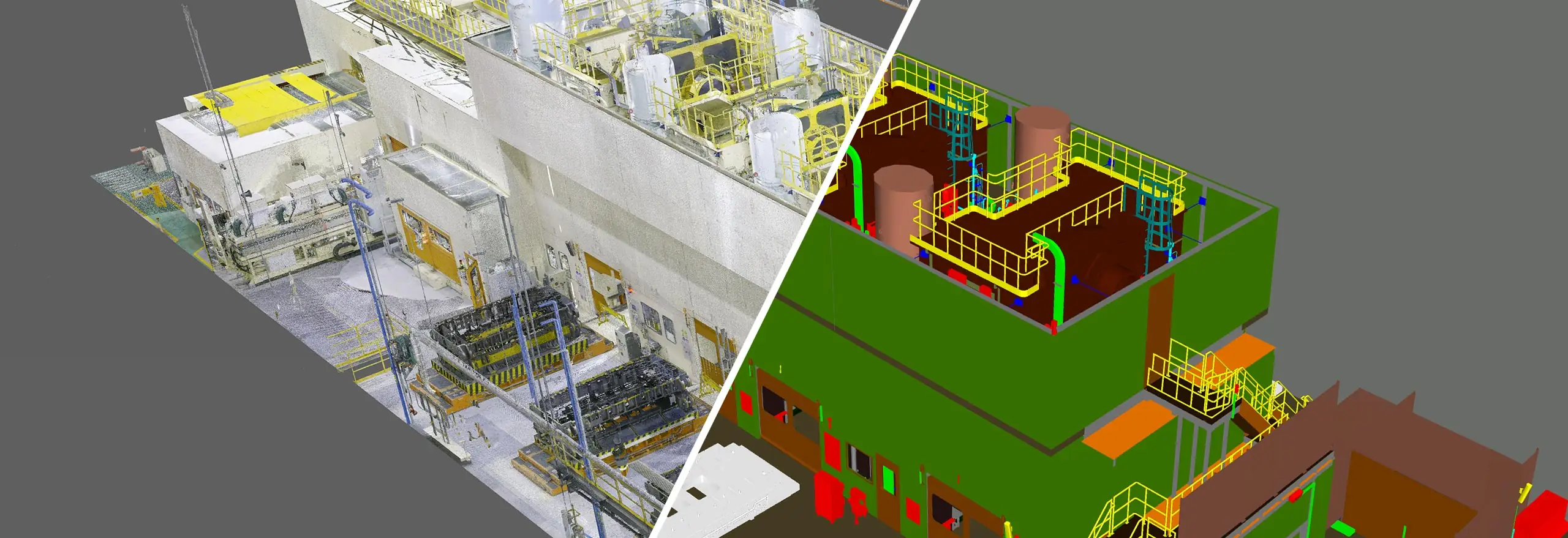
From point cloud to BIM reference.
A how-to on renting an XGRIDS Lixel K2 and capturing trustworthy as-built point cloud reference for your BIM workflow in Singapore yourself.
A how-to on renting an XGRIDS Lixel K2 and capturing trustworthy as-built point cloud reference for your BIM workflow in Singapore yourself.
This is an illustrative field note, not a client case study. It uses no client names, dates, or results. Volumet rents the scanner; the BIM model is built by the renter or a processing partner against the point cloud reference.
Say your BIM team is tasked with modelling existing conditions for an older building ahead of a refurbishment. The record drawings are incomplete and decades of minor changes have gone undocumented. Before any modelling can start, you need a reliable as-built reference layer.
Buying a scanner for a single project is hard to justify, so you rent a Lixel K2 for the capture phase. The rental covers the reality-capture step; the modelling stays in-house where your BIM expertise lives.
With the rented Lixel K2 you capture a registered point cloud of the building in a series of planned walks. Processed in LixelStudio and exported as LAS, E57, or RCP, that cloud drops straight into your BIM environment as a measurable backdrop the modellers trace and verify against.
Keeping capture and modelling separate is deliberate. You control schedule and site access; your BIM team controls model quality and LOD. Neither waits on the other.
The two streams stay coordinated through four checkpoints:
Device specifications describe ideal conditions. What reaches the model depends on capture technique, site conditions, control strategy, and processing. For tolerance-critical or compliance work, agree requirements with the modelling team in advance — and state them in the rental enquiry so the right tier and onboarding are arranged. These are reference workflows, not certified survey deliverables. Where survey-grade control is required, plan for additional control and verification.
Send the building type, area, and tolerance expectations. We will confirm whether a Lixel K2 rental fits your BIM workflow.
Request rental availability