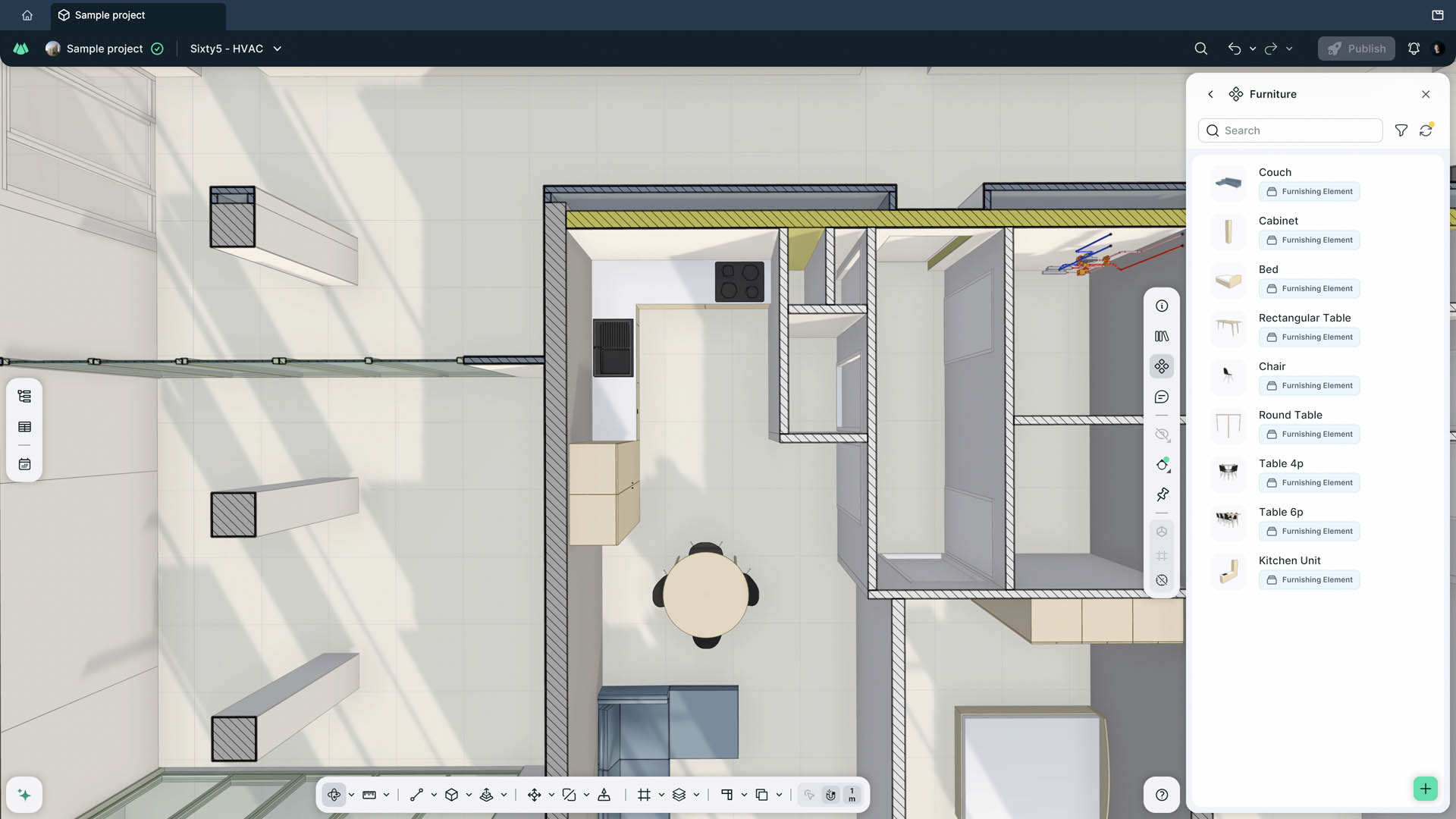
Qonic has pushed its browser-based BIM platform further into authoring, adding native components, streamed site context, rebuilt measurement tools and a project-wide issues view. The company's claim, as reported by AEC Magazine, is that a complete building can now be modelled without leaving the browser. The headline feature is components: doors, windows, furniture and MEP terminals that carry properties and behave as reusable objects rather than geometry. The release also adds a write-back path to Revit for phasing and materials, and follows Revit 2027 support added in July.
If you commission or deliver scan to BIM work in Singapore, that paragraph is worth more than it looks. The question it raises is not whether Qonic is good software. It is whether the model that comes out of a point cloud can now be edited and authored in the same place, rather than being handed to Revit and never coming back.
Why this matters for scan to BIM in Singapore
Most scan to BIM delivery here follows the same shape. We capture, register, clean and classify the point cloud. A modeller then builds the elements in Revit, because that is what the project team, the consultant and the submitting Qualified Person are set up to receive. The model is checked against the cloud, issued, and then the interesting part starts: the client's team edits it, the building changes, and the as-built model drifts from the building unless someone keeps feeding it.
Anything that shortens the distance between the cloud and an editable model is worth watching, because that distance is where most of the cost and most of the error live. The article is clear that components close an obvious hole: walls and slabs alone capped how far a project could develop before going back to Revit. Windows are the test case it names, and it is the right one. A window is tied to its sill, reveal, lintel, casing and host wall thickness. Get that relationship wrong at scale and you have a library to curate, which is the burden the platform was built to remove.
The write-back detail is the one I would flag to a client before the components. Phasing now exports as a string parameter, and Qonic says edits to that parameter can be pushed back into Revit. Materials survive a Revit re-export and update. That is unglamorous and it matters more than any single modelling command, because it decides whether the platform sits alongside Revit or only downstream of it.
What it changes in practice, and what it does not
What changes, if the claims hold at production scale:
| Area | Before | With this release |
|---|---|---|
| Element coverage | Walls and slabs, then back to Revit | Doors, windows, furniture, MEP terminals in-platform |
| Site context | Assembled by hand as a separate file | 3D Tiles streamed in, project at correct coordinates |
| Coordination | Issues visible per model | Issues visible across the project, including unopened models |
| Round trip | One-way export to Revit | Phasing and materials editable back into Revit |
What does not change:
- Capture. None of this touches the scanner, the registration or the cloud. A poorly registered cloud produces a poorly founded model in any authoring tool.
- Accuracy. No figure in the article is an accuracy claim, and none should be read as one. Model accuracy depends on the equipment, the range, the registration method and the level of detail you specify, not on the authoring environment.
- Documentation depth. The article is explicit that drawings are absent from the release notes but present in the product, and that the open question is whether the documentation tools have the depth, control and reliability that production delivery demands. For a Singapore submission or an A&A package, that question is the whole ballgame.
- Your deliverable. If your contract says Revit, IFC or a native format with a stated LOD, the authoring tool is an internal decision for your provider, not a change to your specification.
The browser is also a real constraint, not a marketing point. Streamed context and browser authoring both assume a stable connection, and a full building model with components is heavier than a walls and slabs model. Test on one of your own projects before you move a delivery programme onto it.
Our view: the trade-off, and who should care
Qonic's strategic bet, as the article frames it, is procedures over constrained families: the software updates the surrounding context when someone moves, copies or resizes an opening, rather than relying on a library of heavily constrained families built by specialists. That is a genuine fork in the road. If it works at production scale, a category of specialist family-building work gets smaller. If it does not, you get a component library to curate, which is the thing the platform set out to remove. We do not know which yet, and neither does anyone reading a release note.
The honest position for a scan to BIM client in Singapore is that this is a software story with a slow fuse. It does not change what you should ask for this quarter. It may change who builds your model in two years.
Who should care most:
- Owners of large or repeatedly modified assets. If your as-built model is meant to stay live through fit-outs and A&A works, a platform that lets edits flow back into Revit is more interesting than one that only exports.
- Consultants running federated coordination. The project-wide issues view is aimed squarely at you.
- Anyone specifying scan to BIM for a submission. Care less. Your deliverable is defined by the authority and the contract, not by the tool.
Who should not care yet: anyone whose model is a one-off record, checked once and archived. The round trip never happens, so the write-back advantage never pays out.
Two open questions I would want answered before recommending a change of workflow. First, does the component behaviour hold when the host wall is a scanned, slightly out-of-plumb wall rather than a modelled one? Existing buildings are not square, and that is the normal condition in Singapore's older stock. Second, what happens to the model when the write-back is partial: some parameters round-trip, others do not, and someone has to know which is which. Qonic is hosting an event at its Ghent HQ on 29 October with more features promised, so there may be answers shortly. We will read them the same way: what holds on a real project, not on a launch video.
What to do next
If you are commissioning scan to BIM, the useful move is not to switch tools. It is to tighten what you ask for, so that whichever tool your provider uses, you get a model you can actually use afterwards.
- Specify the deliverable, not the software. State the element scope, the level of detail, the format and the accuracy with the conditions it holds under. Our Scan-to-BIM page sets out how we structure that.
- Ask about the round trip. Will parameters survive an edit and re-export? Who owns the model after handover? What happens when the building changes?
- Get the capture right first. A model is only as good as the cloud beneath it. See 3D laser scanning for how we capture and register, and Automatic Scan-to-BIM: What Accuracy Misses for why segmentation alone does not give you a model.
- If you need a record that stays useful operationally, a digital twin built on capture rather than a modelled asset register may serve you better. Start with Digital twin capture.
- If you already own a scanner and want to produce your own outputs, our equipment rental line covers the hardware. You do the capture and the processing; we do not produce outputs for renters.
- For anything with a defined scope and a deadline, request a quote and we will tell you what the model can and cannot carry at the accuracy you need.